 Mazapan
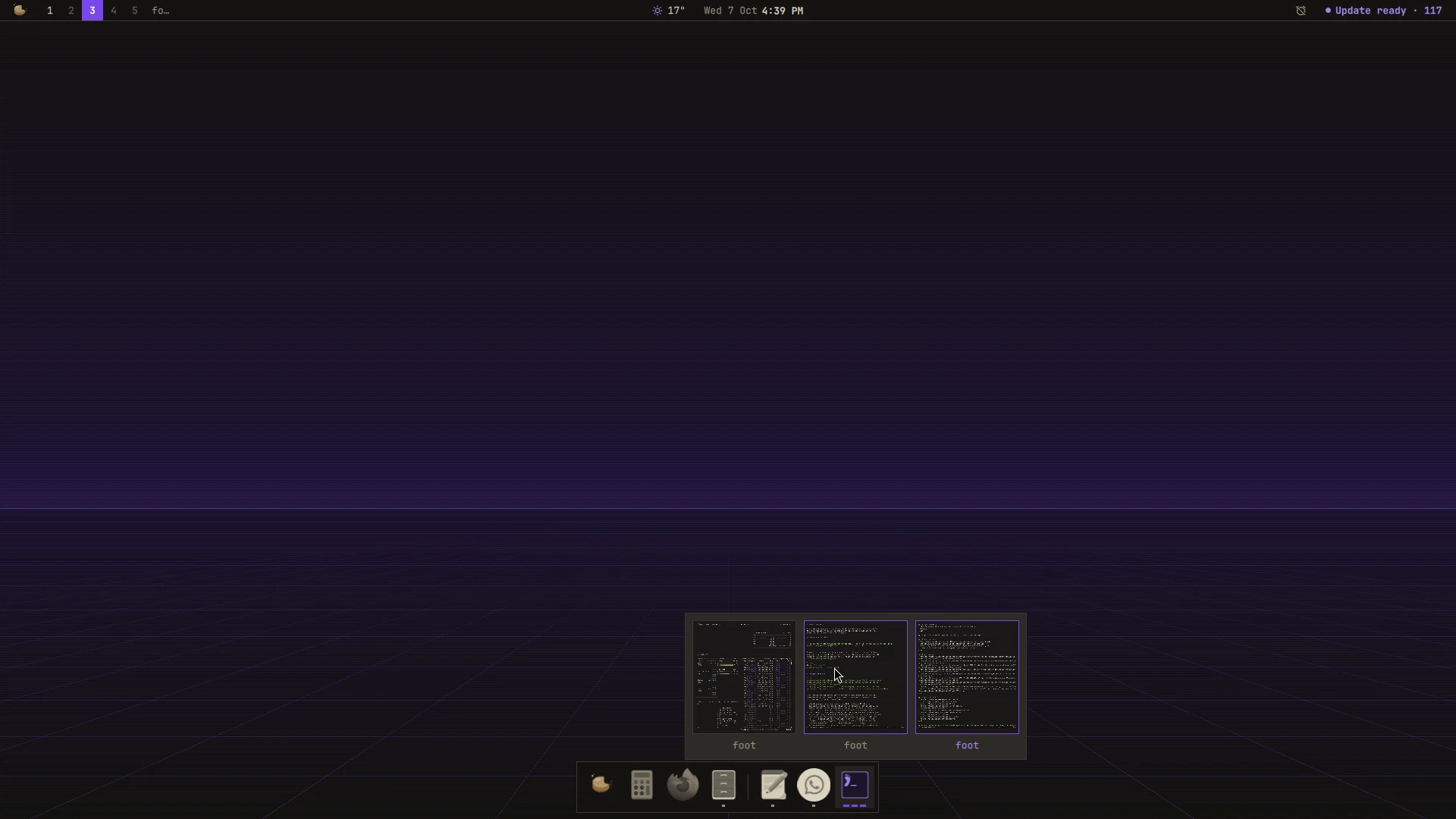
A plugin for Mazapan, listed in its plugin registry.
Your apps at the bottom of the screen: the ones you keep there, then a hairline, then every other app with a window open, in the order they showed up. It takes its colors, corners and motion from the theme, its icons too.
- Icons in the theme's colors, each in one hue as the bar's glyphs
are, still told apart by their shape: dim while the app has no window in
sight (none, or all of them minimized), brighter while it has, the accent
while it has the focus. The
iconssetting gives them back their own colors. - A mark for each window under an app's icon, up to three; the accent while one of them has the focus, hollow while it's minimized.
- The window found, wherever it is. A click on an app with one window goes to it: its workspace, and on the strip of columns, its column, even when it was off the screen.
- Every window of an app, live. An app with several windows shows them side by side above its icon, each with its title: a click goes to one, a middle click closes it. The mouse wheel over the icon goes through them one after the other.
- Minimize: a click on an app whose one window has the focus
minimizes it, and another brings it back, to the workspace you're on.
Hyprland has no minimize of its own, so a minimized window waits on a
special workspace that isn't shown (
special:minimized, the one other docks for Hyprland use too). Its mark goes hollow, the icon dims, and its preview shows it dimmed; picking it, or reaching it with the wheel, brings it back. - Its menu (a right click): the app's own actions (a private window, a new document), a new window, minimize its windows or bring them back, keep it in the dock or take it out, close its windows.
- Out of the way, as you choose: always there with windows leaving it room; only while a window would sit under it (the default); or until the pointer reaches the bottom edge. Away, the bottom edge brings it back.
- Web apps as apps: each web app (the
webappsplugin) has its own icon, not the browser's. - The palette a click away, on the Mazapan button at its start.
A click on an app without windows opens it; a middle click opens another window (with the app's own new window when it has one: Files and Text Editor run once and only raise their window when started again).
SUPER + D shows or hides it; in the palette, "Dock". Each screen has its
own, with that screen's windows.
Apps kept in the dock are a setting, pinned, like any other: in
~/.config/mazapan/config.toml, so they go with it to another machine, and
mazapan undo takes a change back. The order of the other apps is kept in
~/.local/state/mazapan/dock.json, so a reload of the shell (a theme
change) doesn't shuffle them.
What it reaches and why
- Nothing outside this computer. It never goes to the network.
- Your windows, through Hyprland: which app each one is, its title, where it is, to draw the dock and to get out of their way. The previews of an app's windows are live captures of them, taken only while they're out and dropped when they close.
- What it runs: an app you open, through the palette's launcher
(
palette-launch, which says so when one doesn't start);webapp list(plugin webapps), to tell web apps apart;mazapan apply --set dock.pinned=…when you keep an app in the dock or take it out; the palette, from its button. - What it keeps:
~/.local/state/mazapan/dock.json, the order the apps showed up in. - Files it writes: its part of the shell (
components/dock/, the panel that holds a dock for each screen), its key in Hyprland, and its settings, read as they change.
Install
In Mazapan, the Plugins panel (SUPER + SHIFT + P) lists it under the
community's: its page shows what it can do before you install it. Or:
mazapan plugins add dock
mazapan apply
Updates come through the registry: mazapan plugins update dock, or the
Updates panel, asking again only for anything new it would be able to do.
Develop
git clone https://github.com/rick-dev-creator/mazapan-dock
mazapan plugins dev mazapan-dock     # applied again on every save
mazapan plugins check mazapan-dock   # every theme, every language, before a release
node --test mazapan-dock/tests/*.test.mjs   # what the dock decides (Apps.js.tmpl)
What the dock decides (which app a window belongs to, the order, which
window comes next, whether a window covers it) is plain JavaScript in
Apps.js.tmpl, with its tests; the QML files join it to the shell:
DockService (the state, one for every screen), DockWindow (a screen's
dock), DockButton (an app), WindowPicker and AppMenu.
A release is a tag, vX.Y.Z, the same as version in plugin.toml; the
registry lists it once it passes its checks.
License
MIT